ai browser agent
Designing AI browser agent that gets work done for you – completing tasks and filling out forms so you don't have to.
2025
<contribution>
Ux/ui
<tools>
Figma, Claude, Perplexity, ChatGPT

> context & problem
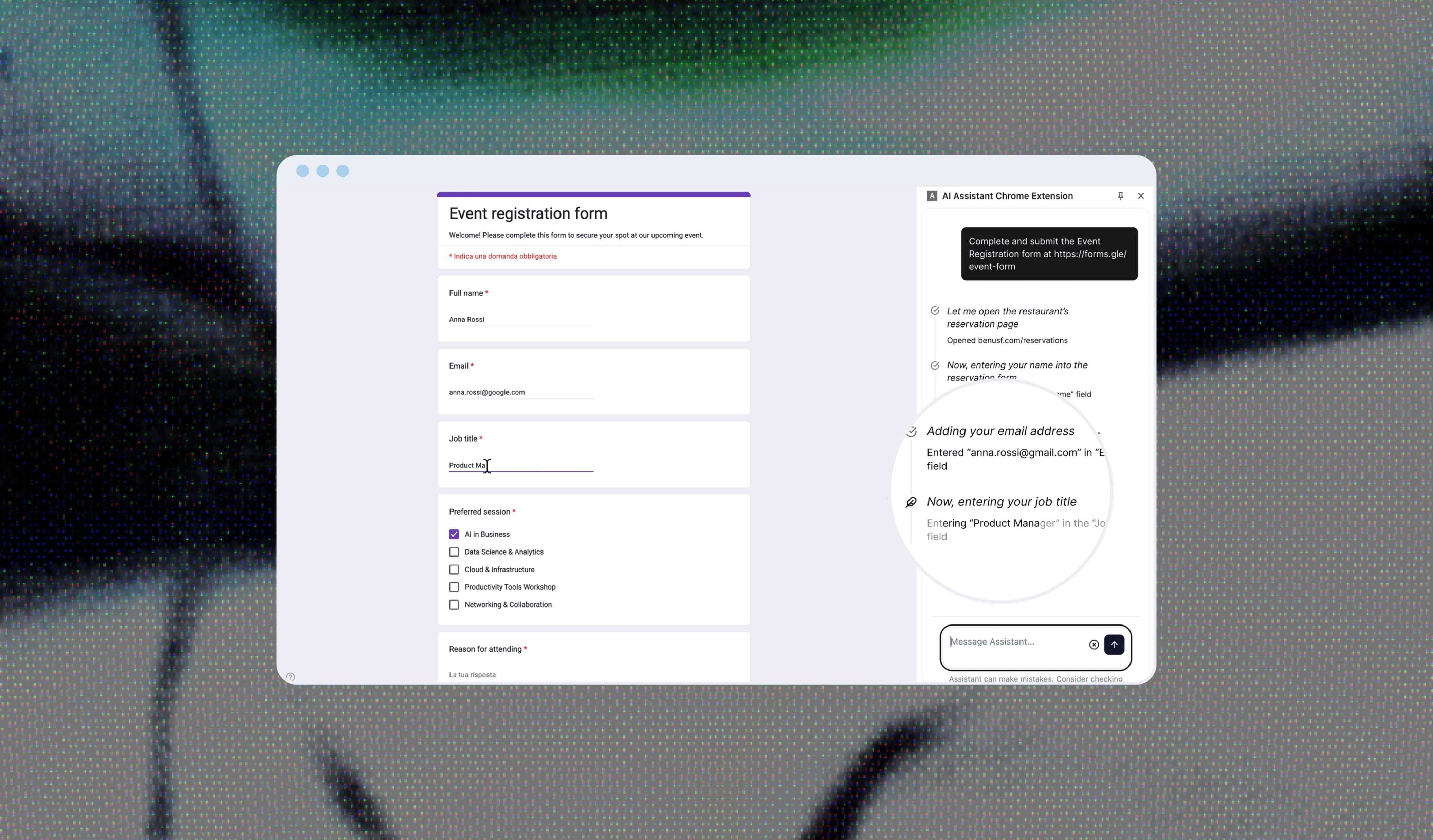
I collaborated with a startup team to design an AI agent that can browse the web and perform tasks on behalf of the user. The agent can inspect web pages and interact with them by typing, clicking, and scrolling, with a primary focus on filling out the forms.
Autonomous agents that browse the web for you sound great – until they quietly mess something up. The real problem was making the agent transparent and trustworthy. How do you keep people in control of something that moves fast, makes its own decisions, and sometimes gets stuck or fails? The real risk wasn’t failure, it was that users wouldn’t trust it enough to actually use it.
Business goals:
Increase task completion rate for agent-initiated actions, reducing abandoned or failed flows
Drive adoption and retention by making the agent reliable enough to use repeatedly
Build enough user trust to justify expanding into more task types beyond form-filling
Reduce early churn caused by confusion or mistrust in the agent's actions
The real problem wasn’t just building a capable agent. It was making it transparent and trustworthy.
> my role
I owned the end-to-end interaction design for the user↔agent communication: task definition, real-time feedback, failure states, clarification flows, and memory. I also defined the agent's physical presence on screen – how its cursor appears, moves, and signals different states. Additionally, I produced marketing assets for the agent listing.
> research
First, I clarified product goals and constraints with the team – what tasks the agent would handle, whether it stayed in one window or switched tabs, and so on. In parallel, I did analysis on what types of tasks the AI browser could support and examined users’ mental models of how an autonomous agent plans and executes actions.
Next, I reviewed existing agentic tools and products to see how they communicate agent behavior — how they visualize sequential actions, expose decision-making, and enable user intervention. I used Perplexity and ChatGPT to synthesize patterns across products and pressure-test my assumptions, quickly surfacing what works, what fails, and where clearer feedback is needed.
Then, I spoke with engineers working with agentic systems, and PM building AI interfaces. These conversations focused on what actions users expect to see, and how much detail is helpful before it becomes overwhelming. The important insight was that users often overestimate the agent’s intelligence early on, then lose trust completely the first time it fails silently, with no clear signal.
Finally, I synthesized the findings into concrete use cases and action types. I mapped common agent workflows and defined a clear taxonomy of action types groups, including web navigation and interaction, content modification and data operations. This framework became the foundation for the action-sequence UI.
Based on the research, I formed the following hypotheses:
If the agent communicates in natural, human-like language instead of rigid status labels, users will find it more trustworthy and less mechanical.
If recovery states and failures are acknowledged and explained instead of silent, then retry rate after failure will increase and abandonment will decrease.
If the agent remembers user preferences and past context, then repeat task completion time will decrease
> constraints & requirements
This was the initial phase of the project, so the feature set was intentionally limited for the first rollout.
My initial concept included more than seven agent states. Engineering and PM pushed back – given the scope, four or five was the practical limit, so we narrowed it to the ones users rely on most:
Navigating
Clicking
Typing
Reading
Waiting/Reasoning/Acknowledging success/failure.
Technical constraints of the MVP also shaped the final decisions, pushing us to prioritize clarity over completeness.
As a small, early-stage team, we also worked within a few practical limitations:
No dedicated user testing pool – some insights came from founder and engineer conversations, not end users
No formal metrics tracked at MVP stage
Small team meant fast iteration

> ideation
Since the team worked with the open-source shadcn library (a customizable set of pre-designed components), I used these recreated components in Figma to create the flow.
During wireframe iteration, I quickly generated low-fidelity variations in Figma Make to share with PM and drive discussion, and used ChatGPT to pressure-test the interaction logic – asking things like, “What happens if the agent misreads a form field?” This helped surface edge cases much faster than mapping them manually.
After multiple iterations, the team approved the agent’s behaviour and structure, and I used it as the basis for the high-fidelity screens.
> design principles
Designing an AI browser agent means rethinking interaction from the ground up. The design of this agent was guided by the following design principles:
1. Human-in-the-loop control
AI agents can act, but users must remain in control. Critical actions should always require confirmation, and users must be able to interrupt or override at any time.
2. Transparency of actions
The system should clearly show what it’s doing and why. Users need visibility into steps, decisions, and data sources to build trust.
3. Memory-informed interactions
The agent draws on past interactions to provide more relevant, contextual responses. Understanding history allows the agent to make smarter, more personalized suggestions over time.
4. Embracing uncertainty to build trust
The agent makes its confidence level visible. When it's uncertain or has troubles to complete a task, it says so – and shows its reasoning.
> design decisions
Real-time, natural task communication
Instead of rigid status labels like “Processing”, I designed the agent to communicate through adaptive, human-like phrasing - “Let me check that…” or “Great, I'll get started”. Natural language better reflects uncertainty while maintaining user trust. This made the system feel more transparent and less mechanical.
Action visibility through lightweight visual cues
Each action is paired with a simple, recognizable icon to make the agent’s behavior scannable at a glance. This reduces cognitive load and helps users quickly understand what’s happening without reading every line of text.

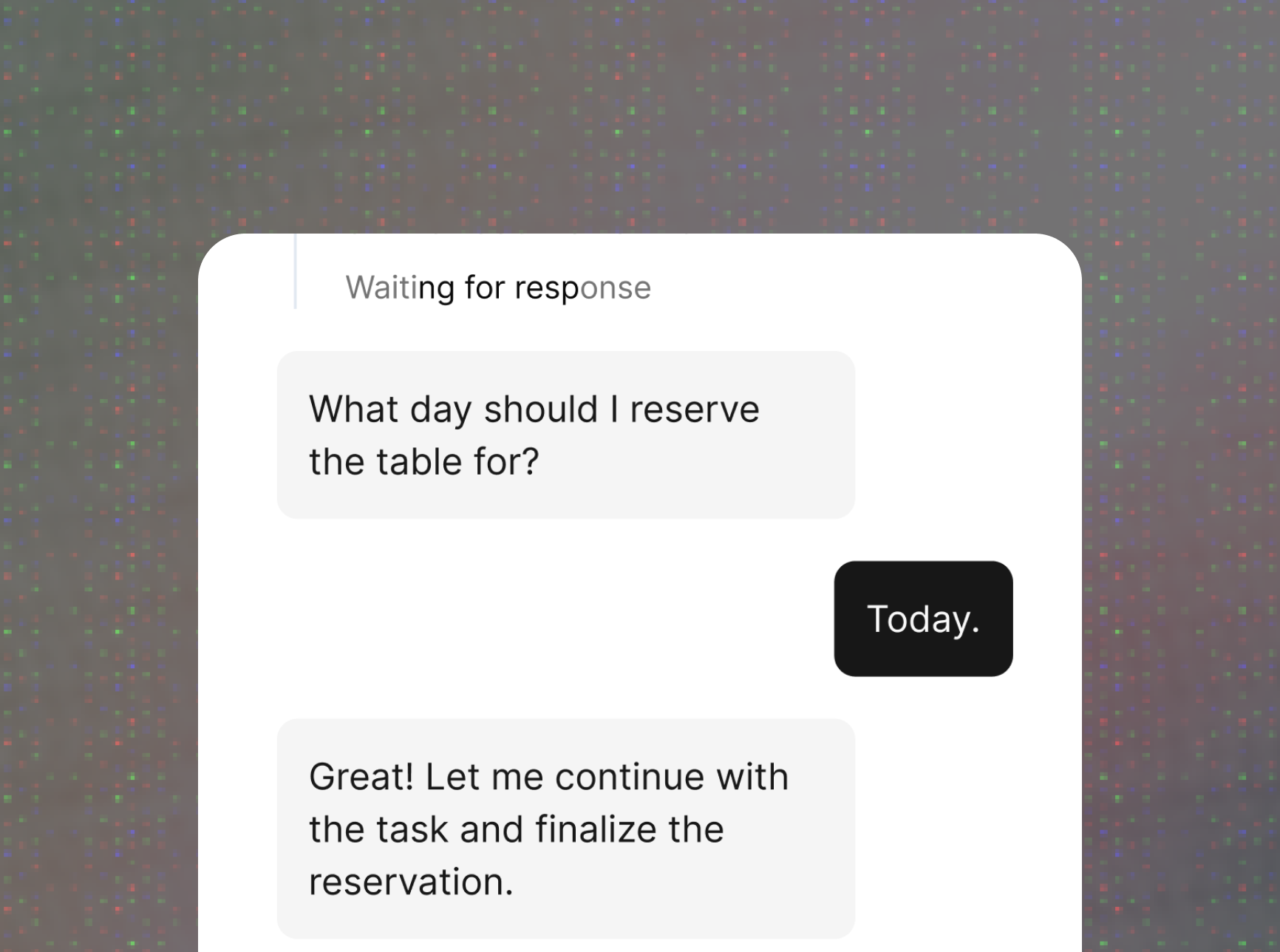
Conversation-first clarifications
When the agent needs more input, it asks directly within the chat, allowing users to clarify and provide input easily.
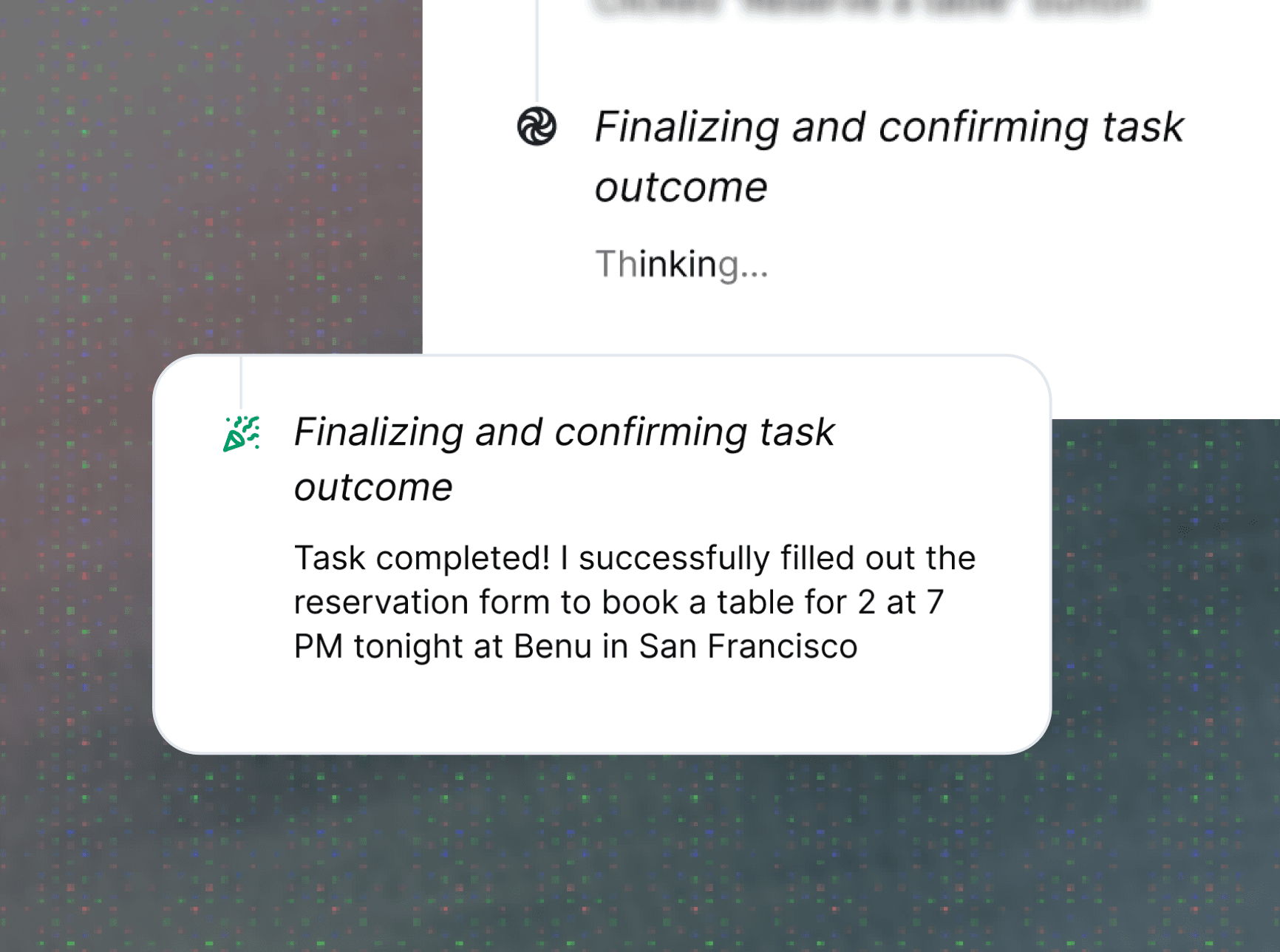
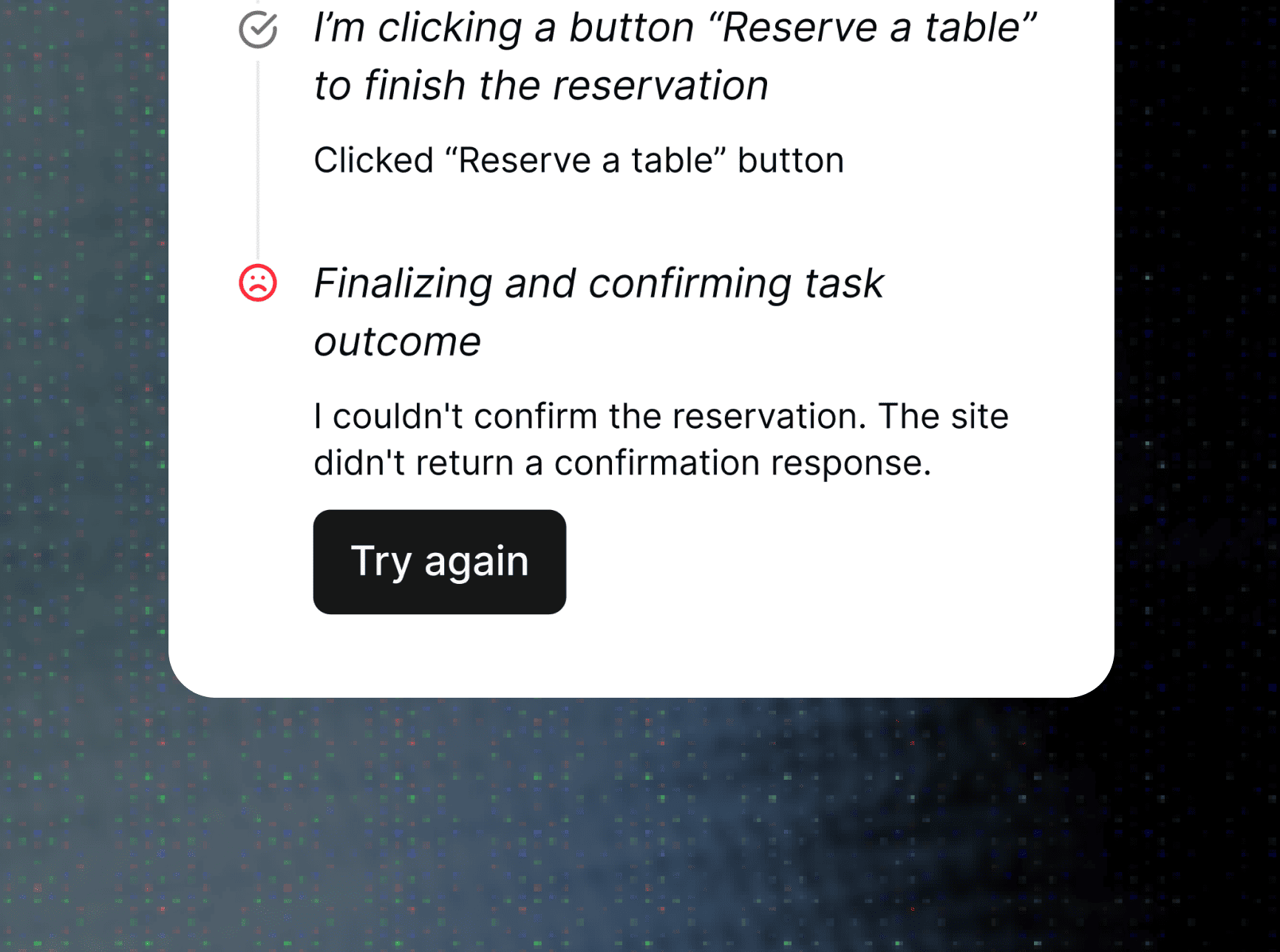
Explicit success, failure, and recovery states
Users are immediately informed if a task succeeds, fails, or is being retried, with visual cues reinforcing the status. Importantly, failures are not silent: the agent acknowledges them and surfaces what it’s doing next. This keeps users informed and in control.
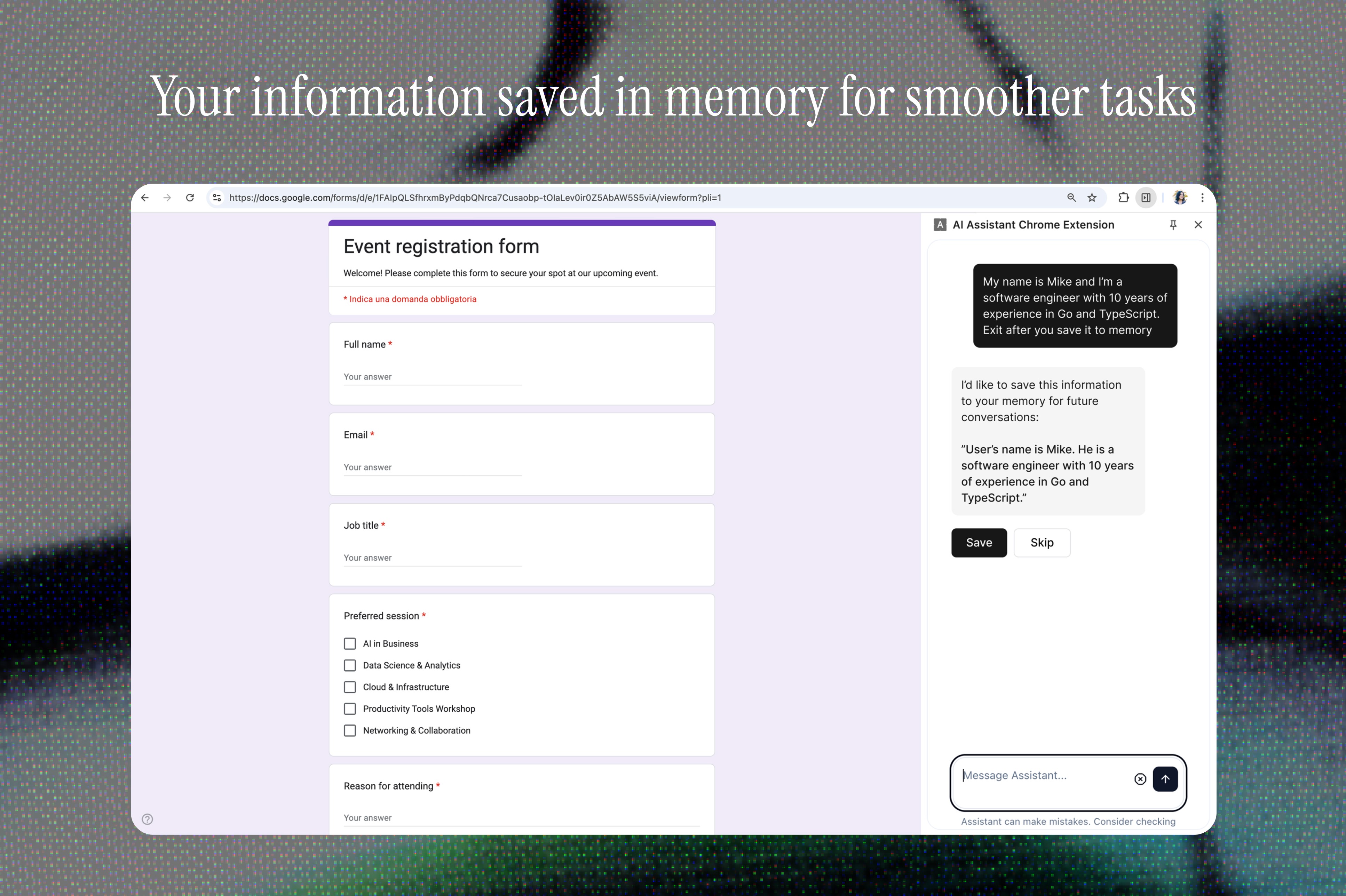
Personalized memory for smoother interactions
The agent can remember user information - such as preferences, job role, and personal details - to make future tasks faster and more personalized.
Agent presence through motion and behavior
Principles applied:
AI cursor is visually distinct from the user's regular cursor and slightly larger – not to confuse with user’s one
Smooth human-like movement, without abrupt motions
Easing functions (ease-in-out cubic).
Short pauses before key actions (hover ~200ms, click ~300ms).
Subtle motion pulsation can simulate more natural "thinking."
When moving to the element, the cursor should slow down smoothly
For context-awareness, cursor should have different states for actions
Can scale slightly on hover over clickable elements to show focus.

> reflection
Designing for an autonomous agent in its earliest form meant making decisions with incomplete information on both sides – the product was still finding its shape, and user behavior around agentic tools was less explored than it is today. This was my first time designing an AI agent, and I was deeply curious about the design principles that should guide this new interaction paradigm.
Some elements of this MVP reflect the constraints of an early-stage project – limited resources, compressed timelines, and no formal success metrics. If I were to iterate today, I'd push to define measurable outcomes from the start and bring real users into the clarification and interaction flows earlier. The patterns I'd use today have also evolved; conversational UI and agentic interaction conventions are constantly maturing.
What I'd measure:
Task completion rate
Time to task completion
Drop-off rate at clarification/failure moments
What I'm most confident in is the scalable framework: the action taxonomy and communication principles were built to scale beyond MVP scope, and that kind of systems thinking is what I'd bring into the next phase, and what I believe makes it a strong base for iteration.
▼ other cases
Built with ❤︎ in Framer + Claude
22:17:51
9/9/2026
ai browser agent
Designing AI browser agent that gets work done for you – completing tasks and filling out forms so you don't have to.
2025
<contribution>
Ux/ui
<tools>
Figma, Claude, Perplexity, ChatGPT
> context & problem
I collaborated with a startup team to design an AI agent that can browse the web and perform tasks on behalf of the user. The agent can inspect web pages and interact with them by typing, clicking, and scrolling, with a primary focus on filling out the forms.
Autonomous agents that browse the web for you sound great – until they quietly mess something up. The real problem was making the agent transparent and trustworthy. How do you keep people in control of something that moves fast, makes its own decisions, and sometimes gets stuck or fails? The real risk wasn’t failure, it was that users wouldn’t trust it enough to actually use it.
Business goals:
Increase task completion rate for agent-initiated actions, reducing abandoned or failed flows
Drive adoption and retention by making the agent reliable enough to use repeatedly
Build enough user trust to justify expanding into more task types beyond form-filling
Reduce early churn caused by confusion or mistrust in the agent's actions
The real problem wasn’t just building a capable agent. It was making it transparent and trustworthy.
> my role
I owned the end-to-end interaction design for the user↔agent communication: task definition, real-time feedback, failure states, clarification flows, and memory. I also defined the agent's physical presence on screen – how its cursor appears, moves, and signals different states. Additionally, I produced marketing assets for the agent listing.
> research
First, I clarified product goals and constraints with the team – what tasks the agent would handle, whether it stayed in one window or switched tabs, and so on. In parallel, I did analysis on what types of tasks the AI browser could support and examined users’ mental models of how an autonomous agent plans and executes actions.
Next, I reviewed existing agentic tools and products to see how they communicate agent behavior — how they visualize sequential actions, expose decision-making, and enable user intervention. I used Perplexity and ChatGPT to synthesize patterns across products and pressure-test my assumptions, quickly surfacing what works, what fails, and where clearer feedback is needed.
Then, I spoke with engineers working with agentic systems, and PM building AI interfaces. These conversations focused on what actions users expect to see, and how much detail is helpful before it becomes overwhelming. The important insight was that users often overestimate the agent’s intelligence early on, then lose trust completely the first time it fails silently, with no clear signal.
Finally, I synthesized the findings into concrete use cases and action types. I mapped common agent workflows and defined a clear taxonomy of action types groups, including web navigation and interaction, content modification and data operations. This framework became the foundation for the action-sequence UI.
Based on the research, I formed the following hypotheses:
If the agent communicates in natural, human-like language instead of rigid status labels, users will find it more trustworthy and less mechanical.
If recovery states and failures are acknowledged and explained instead of silent, then retry rate after failure will increase and abandonment will decrease.
If the agent remembers user preferences and past context, then repeat task completion time will decrease
> constraints & requirements
This was the initial phase of the project, so the feature set was intentionally limited for the first rollout.
My initial concept included more than seven agent states. Engineering and PM pushed back – given the scope, four or five was the practical limit, so we narrowed it to the ones users rely on most:
Navigating
Clicking
Typing
Reading
Waiting/Reasoning/Acknowledging success/failure.
Technical constraints of the MVP also shaped the final decisions, pushing us to prioritize clarity over completeness.
As a small, early-stage team, we also worked within a few practical limitations:
No dedicated user testing pool – some insights came from founder and engineer conversations, not end users
No formal metrics tracked at MVP stage
Small team meant fast iteration
> ideation
Since the team worked with the open-source shadcn library (a customizable set of pre-designed components), I used these recreated components in Figma to create the flow.
During wireframe iteration, I quickly generated low-fidelity variations in Figma Make to share with PM and drive discussion, and used ChatGPT to pressure-test the interaction logic – asking things like, “What happens if the agent misreads a form field?” This helped surface edge cases much faster than mapping them manually.
After multiple iterations, the team approved the agent’s behaviour and structure, and I used it as the basis for the high-fidelity screens.
> design principles
Designing an AI browser agent means rethinking interaction from the ground up. The design of this agent was guided by the following design principles:
1. Human-in-the-loop control
AI agents can act, but users must remain in control. Critical actions should always require confirmation, and users must be able to interrupt or override at any time.
2. Transparency of actions
The system should clearly show what it’s doing and why. Users need visibility into steps, decisions, and data sources to build trust.
3. Memory-informed interactions
The agent draws on past interactions to provide more relevant, contextual responses. Understanding history allows the agent to make smarter, more personalized suggestions over time.
4. Embracing uncertainty to build trust
The agent makes its confidence level visible. When it's uncertain or has troubles to complete a task, it says so – and shows its reasoning.
> design decisions
Real-time, natural task communication
Instead of rigid status labels like “Processing”, I designed the agent to communicate through adaptive, human-like phrasing - “Let me check that…” or “Great, I'll get started”. Natural language better reflects uncertainty while maintaining user trust. This made the system feel more transparent and less mechanical.
Action visibility through lightweight visual cues
Each action is paired with a simple, recognizable icon to make the agent’s behavior scannable at a glance. This reduces cognitive load and helps users quickly understand what’s happening without reading every line of text.
Conversation-first clarifications
When the agent needs more input, it asks directly within the chat, allowing users to clarify and provide input easily.
Explicit success, failure, and recovery states
Users are immediately informed if a task succeeds, fails, or is being retried, with visual cues reinforcing the status. Importantly, failures are not silent: the agent acknowledges them and surfaces what it’s doing next. This keeps users informed and in control.
Personalized memory for smoother interactions
The agent can remember user information - such as preferences, job role, and personal details - to make future tasks faster and more personalized.
Agent presence through motion and behavior
Principles applied:
AI cursor is visually distinct from the user's regular cursor and slightly larger – not to confuse with user’s one
Smooth human-like movement, without abrupt motions
Easing functions (ease-in-out cubic).
Short pauses before key actions (hover ~200ms, click ~300ms).
Subtle motion pulsation can simulate more natural "thinking."
When moving to the element, the cursor should slow down smoothly
For context-awareness, cursor should have different states for actions
Can scale slightly on hover over clickable elements to show focus.
> reflection
Designing for an autonomous agent in its earliest form meant making decisions with incomplete information on both sides – the product was still finding its shape, and user behavior around agentic tools was less explored than it is today. This was my first time designing an AI agent, and I was deeply curious about the design principles that should guide this new interaction paradigm.
Some elements of this MVP reflect the constraints of an early-stage project – limited resources, compressed timelines, and no formal success metrics. If I were to iterate today, I'd push to define measurable outcomes from the start and bring real users into the clarification and interaction flows earlier. The patterns I'd use today have also evolved; conversational UI and agentic interaction conventions are constantly maturing.
What I'd measure:
Task completion rate
Time to task completion
Drop-off rate at clarification/failure moments
What I'm most confident in is the scalable framework: the action taxonomy and communication principles were built to scale beyond MVP scope, and that kind of systems thinking is what I'd bring into the next phase, and what I believe makes it a strong base for iteration.
▼ other cases
Built with ❤︎ in Framer + Claude
22:17:51
9/9/2026
ai browser agent
Designing AI browser agent that gets work done for you – completing tasks and filling out forms so you don't have to.
2025
<contribution>
Ux/ui
<tools>
Figma, Claude, Perplexity, ChatGPT
> context & problem
I collaborated with a startup team to design an AI agent that can browse the web and perform tasks on behalf of the user. The agent can inspect web pages and interact with them by typing, clicking, and scrolling, with a primary focus on filling out the forms.
Autonomous agents that browse the web for you sound great – until they quietly mess something up. The real problem was making the agent transparent and trustworthy. How do you keep people in control of something that moves fast, makes its own decisions, and sometimes gets stuck or fails? The real risk wasn’t failure, it was that users wouldn’t trust it enough to actually use it.
Business goals:
Increase task completion rate for agent-initiated actions, reducing abandoned or failed flows
Drive adoption and retention by making the agent reliable enough to use repeatedly
Build enough user trust to justify expanding into more task types beyond form-filling
Reduce early churn caused by confusion or mistrust in the agent's actions
The real problem wasn’t just building a capable agent. It was making it transparent and trustworthy.
> my role
I owned the end-to-end interaction design for the user↔agent communication: task definition, real-time feedback, failure states, clarification flows, and memory. I also defined the agent's physical presence on screen – how its cursor appears, moves, and signals different states. Additionally, I produced marketing assets for the agent listing.
> research
First, I clarified product goals and constraints with the team – what tasks the agent would handle, whether it stayed in one window or switched tabs, and so on. In parallel, I did analysis on what types of tasks the AI browser could support and examined users’ mental models of how an autonomous agent plans and executes actions.
Next, I reviewed existing agentic tools and products to see how they communicate agent behavior — how they visualize sequential actions, expose decision-making, and enable user intervention. I used Perplexity and ChatGPT to synthesize patterns across products and pressure-test my assumptions, quickly surfacing what works, what fails, and where clearer feedback is needed.
Then, I spoke with engineers working with agentic systems, and PM building AI interfaces. These conversations focused on what actions users expect to see, and how much detail is helpful before it becomes overwhelming. The important insight was that users often overestimate the agent’s intelligence early on, then lose trust completely the first time it fails silently, with no clear signal.
Finally, I synthesized the findings into concrete use cases and action types. I mapped common agent workflows and defined a clear taxonomy of action types groups, including web navigation and interaction, content modification and data operations. This framework became the foundation for the action-sequence UI.
Based on the research, I formed the following hypotheses:
If the agent communicates in natural, human-like language instead of rigid status labels, users will find it more trustworthy and less mechanical.
If recovery states and failures are acknowledged and explained instead of silent, then retry rate after failure will increase and abandonment will decrease.
If the agent remembers user preferences and past context, then repeat task completion time will decrease
> constraints & requirements
This was the initial phase of the project, so the feature set was intentionally limited for the first rollout.
My initial concept included more than seven agent states. Engineering and PM pushed back – given the scope, four or five was the practical limit, so we narrowed it to the ones users rely on most:
Navigating
Clicking
Typing
Reading
Waiting/Reasoning/Acknowledging success/failure.
Technical constraints of the MVP also shaped the final decisions, pushing us to prioritize clarity over completeness.
As a small, early-stage team, we also worked within a few practical limitations:
No dedicated user testing pool – some insights came from founder and engineer conversations, not end users
No formal metrics tracked at MVP stage
Small team meant fast iteration
> ideation
Since the team worked with the open-source shadcn library (a customizable set of pre-designed components), I used these recreated components in Figma to create the flow.
During wireframe iteration, I quickly generated low-fidelity variations in Figma Make to share with PM and drive discussion, and used ChatGPT to pressure-test the interaction logic – asking things like, “What happens if the agent misreads a form field?” This helped surface edge cases much faster than mapping them manually.
After multiple iterations, the team approved the agent’s behaviour and structure, and I used it as the basis for the high-fidelity screens.
> design principles
Designing an AI browser agent means rethinking interaction from the ground up. The design of this agent was guided by the following design principles:
1. Human-in-the-loop control
AI agents can act, but users must remain in control. Critical actions should always require confirmation, and users must be able to interrupt or override at any time.
2. Transparency of actions
The system should clearly show what it’s doing and why. Users need visibility into steps, decisions, and data sources to build trust.
3. Memory-informed interactions
The agent draws on past interactions to provide more relevant, contextual responses. Understanding history allows the agent to make smarter, more personalized suggestions over time.
4. Embracing uncertainty to build trust
The agent makes its confidence level visible. When it's uncertain or has troubles to complete a task, it says so – and shows its reasoning.
> design decisions
Real-time, natural task communication
Instead of rigid status labels like “Processing”, I designed the agent to communicate through adaptive, human-like phrasing - “Let me check that…” or “Great, I'll get started”. Natural language better reflects uncertainty while maintaining user trust. This made the system feel more transparent and less mechanical.
Action visibility through lightweight visual cues
Each action is paired with a simple, recognizable icon to make the agent’s behavior scannable at a glance. This reduces cognitive load and helps users quickly understand what’s happening without reading every line of text.
Conversation-first clarifications
When the agent needs more input, it asks directly within the chat, allowing users to clarify and provide input easily.
Explicit success, failure, and recovery states
Users are immediately informed if a task succeeds, fails, or is being retried, with visual cues reinforcing the status. Importantly, failures are not silent: the agent acknowledges them and surfaces what it’s doing next. This keeps users informed and in control.
Personalized memory for smoother interactions
The agent can remember user information - such as preferences, job role, and personal details - to make future tasks faster and more personalized.
Agent presence through motion and behavior
Principles applied:
AI cursor is visually distinct from the user's regular cursor and slightly larger – not to confuse with user’s one
Smooth human-like movement, without abrupt motions
Easing functions (ease-in-out cubic).
Short pauses before key actions (hover ~200ms, click ~300ms).
Subtle motion pulsation can simulate more natural "thinking."
When moving to the element, the cursor should slow down smoothly
For context-awareness, cursor should have different states for actions
Can scale slightly on hover over clickable elements to show focus.
> reflection
Designing for an autonomous agent in its earliest form meant making decisions with incomplete information on both sides – the product was still finding its shape, and user behavior around agentic tools was less explored than it is today. This was my first time designing an AI agent, and I was deeply curious about the design principles that should guide this new interaction paradigm.
Some elements of this MVP reflect the constraints of an early-stage project – limited resources, compressed timelines, and no formal success metrics. If I were to iterate today, I'd push to define measurable outcomes from the start and bring real users into the clarification and interaction flows earlier. The patterns I'd use today have also evolved; conversational UI and agentic interaction conventions are constantly maturing.
What I'd measure:
Task completion rate
Time to task completion
Drop-off rate at clarification/failure moments
What I'm most confident in is the scalable framework: the action taxonomy and communication principles were built to scale beyond MVP scope, and that kind of systems thinking is what I'd bring into the next phase, and what I believe makes it a strong base for iteration.
▼ other cases
Built with ❤︎ in Framer + Claude
22:17:51
9/9/2026
ai browser agent
Designing AI browser agent that gets work done for you – completing tasks and filling out forms so you don't have to.
2025
<contribution>
Ux/ui
<tools>
Figma, Claude, Perplexity, ChatGPT
> context & problem
I collaborated with a startup team to design an AI agent that can browse the web and perform tasks on behalf of the user. The agent can inspect web pages and interact with them by typing, clicking, and scrolling, with a primary focus on filling out the forms.
Autonomous agents that browse the web for you sound great – until they quietly mess something up. The real problem was making the agent transparent and trustworthy. How do you keep people in control of something that moves fast, makes its own decisions, and sometimes gets stuck or fails? The real risk wasn’t failure, it was that users wouldn’t trust it enough to actually use it.
Business goals:
Increase task completion rate for agent-initiated actions, reducing abandoned or failed flows
Drive adoption and retention by making the agent reliable enough to use repeatedly
Build enough user trust to justify expanding into more task types beyond form-filling
Reduce early churn caused by confusion or mistrust in the agent's actions
The real problem wasn’t just building a capable agent. It was making it transparent and trustworthy.
> my role
I owned the end-to-end interaction design for the user↔agent communication: task definition, real-time feedback, failure states, clarification flows, and memory. I also defined the agent's physical presence on screen – how its cursor appears, moves, and signals different states. Additionally, I produced marketing assets for the agent listing.
> research
First, I clarified product goals and constraints with the team – what tasks the agent would handle, whether it stayed in one window or switched tabs, and so on. In parallel, I did analysis on what types of tasks the AI browser could support and examined users’ mental models of how an autonomous agent plans and executes actions.
Next, I reviewed existing agentic tools and products to see how they communicate agent behavior — how they visualize sequential actions, expose decision-making, and enable user intervention. I used Perplexity and ChatGPT to synthesize patterns across products and pressure-test my assumptions, quickly surfacing what works, what fails, and where clearer feedback is needed.
Then, I spoke with engineers working with agentic systems, and PM building AI interfaces. These conversations focused on what actions users expect to see, whether they want the ability to modify the sequence, and how much detail is helpful before it becomes overwhelming. The important insight was that users often overestimate the agent’s intelligence early on, then lose trust completely the first time it fails,– not because the failure is bad, but because it is silent, with no clear signal.
Finally, I synthesized the findings into concrete use cases and action types. I mapped common agent workflows and defined a clear taxonomy of action types groups, including web navigation and interaction, content modification and data operations. This framework became the foundation for the action-sequence UI.
Based on the research, I formed the following hypotheses:
If the agent communicates in natural, human-like language instead of rigid status labels, users will find it more trustworthy and less mechanical.
If recovery states and failures are acknowledged and explained instead of silent, then retry rate after failure will increase and abandonment will decrease.
If the agent remembers user preferences and past context, then repeat task completion time will decrease
> constraints & requirements
This was the initial phase of the project, so the feature set was intentionally limited for the first rollout.
My initial concept included more than seven agent states. Engineering and PM pushed back – given the scope, four or five was the practical limit, so we narrowed it to the ones users rely on most:
Navigating
Clicking
Typing
Reading
Waiting/Reasoning/Acknowledging success/failure.
Technical constraints of the MVP also shaped the final decisions, pushing us to prioritize clarity over completeness.
As a small, early-stage team, we also worked within a few practical limitations:
No dedicated user testing pool – some insights came from founder and engineer conversations, not end users
No formal metrics tracked at MVP stage
Small team meant fast iteration
> ideation
Since the team worked with the open-source shadcn library (a customizable set of pre-designed components), I used these recreated components in Figma to create the flow.
During wireframe iteration, I quickly generated low-fidelity variations in Figma Make to share with PM and drive discussion, and used ChatGPT to pressure-test the interaction logic –asking things like, “What happens if the agent misreads a form field?” This helped surface edge cases much faster than mapping them manually.
After multiple iterations, the team approved the agent’s behaviour and structure, and I used it as the basis for the high-fidelity screens.
> design principles
Designing an AI browser agent means rethinking interaction from the ground up. The design of this agent was guided by the following design principles:
1. Human-in-the-loop control
AI agents can act, but users must remain in control. Critical actions should always require confirmation, and users must be able to interrupt or override at any time.
2. Transparency of actions
The system should clearly show what it’s doing and why. Users need visibility into steps, decisions, and data sources to build trust.
3. Memory-informed interactions
The agent draws on past interactions to provide more relevant, contextual responses. Understanding history allows the agent to make smarter, more personalized suggestions over time.
4. Embracing uncertainty to build trust
The agent makes its confidence level visible. When it's uncertain or has troubles to complete a task, it says so – and shows its reasoning.
> design decisions
Real-time, natural task communication
Instead of rigid status labels like “Processing”, I designed the agent to communicate through adaptive, human-like phrasing - “Let me check that…” or “Great, I'll get started”. Natural language better reflects uncertainty while maintaining user trust. This made the system feel more transparent and less mechanical.
Action visibility through lightweight visual cues
Each action is paired with a simple, recognizable icon to make the agent’s behavior scannable at a glance. This reduces cognitive load and helps users quickly understand what’s happening without reading every line of text.
Conversation-first clarifications
When the agent needs more input, it asks directly within the chat, allowing users to clarify and provide input easily.
Explicit success, failure, and recovery states
Users are immediately informed if a task succeeds, fails, or is being retried, with visual cues reinforcing the status. Importantly, failures are not silent: the agent acknowledges them and surfaces what it’s doing next. This keeps users informed and in control.
Personalized memory for smoother interactions
The agent can remember user information - such as preferences, job role, and personal details - to make future tasks faster and more personalized.
Agent presence through motion and behavior
Principles applied:
AI cursor is visually distinct from the user's regular cursor and slightly larger–not to confuse with user’s one
Smooth human-like movement, without abrupt motions
Easing functions (ease-in-out cubic).
Short pauses before key actions (hover ~200ms, click ~300ms).
Subtle motion pulsation can simulate more natural "thinking."
When moving to the element, the cursor should slow down smoothly
For context-awareness, cursor should have different states for actions
Can scale slightly on hover over clickable elements to show focus.
> reflection
Designing for an autonomous agent in its earliest form meant making decisions with incomplete information on both sides – the product was still finding its shape, and user behavior around agentic tools was less explored than it is today. This was my first time designing an AI agent, and I was deeply curious about the design principles that should guide this new interaction paradigm.
Some elements of this MVP reflect the constraints of an early-stage project – limited resources, compressed timelines, and no formal success metrics. If I were to iterate today, I'd push to define measurable outcomes from the start and bring real users into the clarification and interaction flows earlier. The patterns I'd use today have also evolved; conversational UI and agentic interaction conventions are constantly maturing.
What I'd measure:
Task completion rate
Time to task completion
Drop-off rate at clarification/failure moments
What I'm most confident in is the scalable framework: the action taxonomy and communication principles were built to scale beyond MVP scope, and that kind of systems thinking is what I'd bring into the next phase, and what I believe makes it a strong base for iteration.
▼ other cases
Built with ❤︎ in Framer + Claude
22:17:51
9/9/2026