hexa.ai
Designing an AI-powered assistant to help scientists efficiently manage robots for lunar exploration: a solo challenge for Bending Spoons.
2025 – 2026
<contribution>
Mobile app design, ux/ui
<tools>
Figma, Claude, Perplexity, ChatGPT

> context & problem
Designflows is a product design challenge organised by Bending Spoons. I completed this challenge independently, owning the full process from research to high-fidelity design. Within a four-day timeline, I defined the user flow and translated it into three polished screens.
The brief was really fun: designing an app to help lunar crews manage Hexabots – autonomous robots that collect resources on the Moon. The goal was to allow users to assign tasks, monitor progress, and receive vital updates in an effortless and efficient manner, even in extreme conditions.
In the scenario, a research team inside a lunar dome is running low on materials needed for a turbine prototype. Using the app, the user checks the status of available Hexabots, picks the most suitable one, and assigns it to collect the resources – then tracks the mission until the robot safely returns.
> constraints & requirements
Users: Two main types of users: mission-focused explorers and researchers who multitask under pressure, and non-technical families who need simple, easy-to-understand interactions.
Behaviours: Frequent status checks, time-sensitive task assignments, and use in physically challenging conditions – wearing thick gloves, helmets, and with limited mobility.
Preferences: Voice commands, personalisation, and clear task assignment to avoid any confusion during critical moments.
Scenario: Manage Hexabots to collect materials for a turbine prototype – check their status, assign tasks, and track progress to completion.
Timeframe: 4 days to design a low-fidelity user flow and deliver three high-fidelity screens.
> research
I started with desk research into lunar robotics, focusing on how resources could be gathered on the Moon, the kinds of tasks involved, and the challenges of remote robot control: extreme temperatures, communication delays, and the physical limitations of suited operators. I benchmarked AI-enabled control software and mission operations interfaces (including NASA tools), studied remote control interaction patterns, and looked at adjacent domains like driver assistance and voice command apps for task delegation. I also documented the key UI considerations specific to space interfaces.
To move faster, I used tools like Perplexity and Claude, which helped surface more niche technical constraints early on.

> insights
I synthesised research findings into three focused problem statements:
Scientists need fast, reliable ways to assign and track missions, so critical operations don't slow down.
Crews working in bulky spacesuits need intuitive touch and voice controls that work despite low gravity, suit constraints, and high-pressure situations.
Teams need clear, reliable interfaces for alerts and status updates, even when conditions are tough or communications are delayed.
Key design insights from research:
Navigation and primary controls need to work with thick gloves. Placing key actions at the bottom is essential, as it makes interactions more accessible and accurate.
Voice recognition must perform reliably while wearing suits or during manual operations. Voice-activated task assignment could improve usability.
High contrast, generous spacing, and clear layouts are critical for readability in harsh conditions like glare, dust, or low light.
The environment is inherently high-stress: low gravity, delayed Earth responses, and the constant risk of failure. The interface must ease that pressure and reduce cognitive load.
Users need instant fleet oversight: clear robot statuses, live mission updates, and simple, low-error task assignment so they can coordinate multiple Hexabots without confusion.
Next, I built user personas (e.g., Turbine Engineer for material runs, Ops Manager for coordination) and mapped their journey across the main use cases like task setup, live tracking, voice alerts, and reboots to shape the main user flow.
The interface must enable fast decisions, low-error actions, and clear feedback in a high-stress environment.
> ideation
I started ideation with low-fidelity sketches for a strong onboarding experience, followed by a personalized board homepage as the default view with easy access to voice mode for task assignments and status checks. This setup aimed to give users an at-a-glance overview of their Hexabots while keeping voice controls one tap away.
For ideation, I used Figma Make and ChatGPT to generate quick concepts. These tools worked best once I had a clear direction – reminding me that AI is great for speeding things up, but it still depends on strong thinking and well-defined problems to begin with.
> validation
I tested the early prototypes using AI tools, like Velocity and Figma Make. Since I didn’t have access to real lunar researchers, I used AI critique as a deliberate proxy within the time and resource constraints.
It helped guide key decisions, like simplifying navigation, increasing button sizes, and improving contrast before moving into high-fidelity screens. It’s not a substitute for real user testing, but within a four-day sprint, it was a practical way to validate assumptions and make informed design choices.
The research results consistently showed that relying on a visual board as the starting point added unnecessary friction – users needed a faster, more direct way to act. Based on this, I shifted the experience to make voice the primary interaction, with the board repositioned as a secondary, supporting view.
I also used AI for pressure-testing, simulating stakeholder interrogation - prompting it to question my decisions the way a sceptical product manager or domain expert might. Rather than asking for general feedback, I gave it context about the constraints and asked it to push back: Why voice over touch? Have you accounted for cognitive load during high-stress tasks?
It pushed me to articulate and sometimes rethink the reasoning behind key decisions before turning them into high-fidelity designs. It’s a different kind of validation than usability testing: less about whether something works, and more about whether the thinking behind it makes sense.
Within a tight timeline, I used rapid validation and pressure-testing with AI to turn assumptions into informed design decisions.
> design decisions
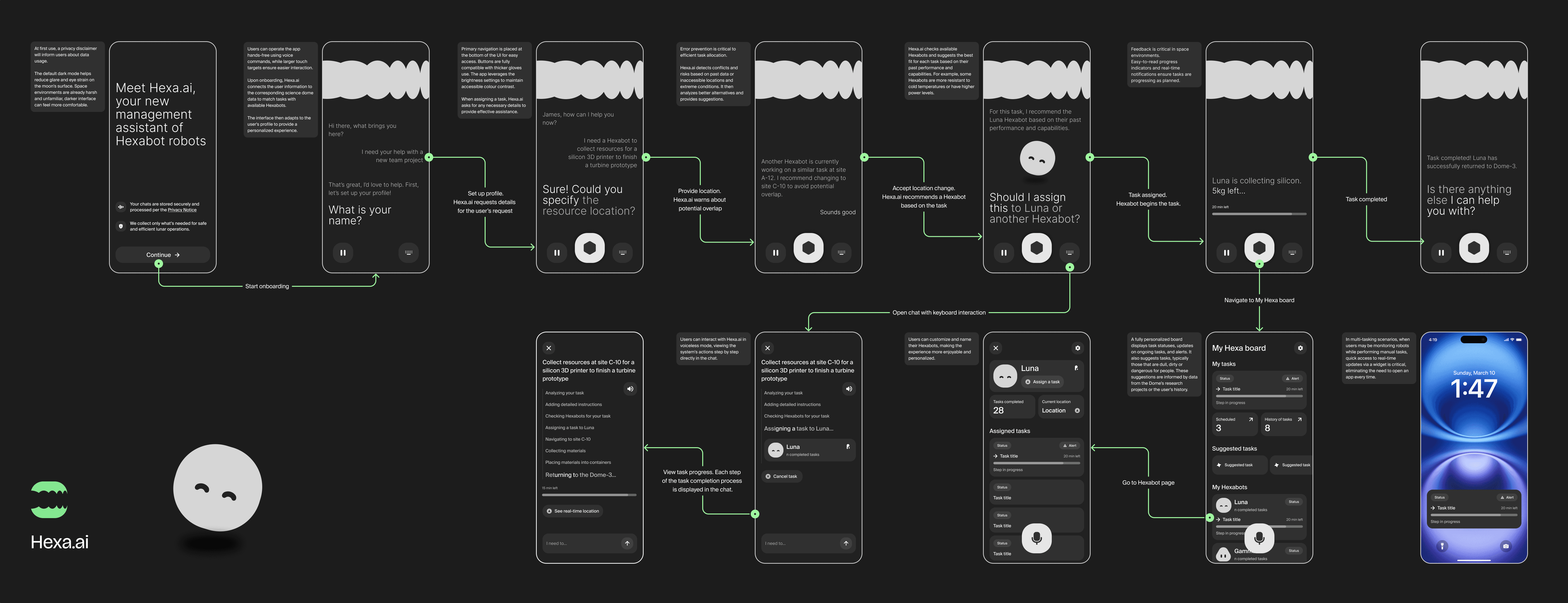
I selected 12 lo-fi screens to refine logic and usability, then I narrowed it down into 3 hi-fi screens for the final submission. Here's what shaped the core design decisions:
Voice-first by default
The app opens directly into voice mode. In hands-free conditions, voice is the fastest and most reliable input. The board is one tap away as a secondary visual hub.
Dark mode as a functional choice
The default dark interface reduces glare and eye strain on the Moon's surface. In an already harsh and disorienting environment, a darker UI is more comfortable and easier to read.
Transparency builds trust
Given that Hexa.ai is AI-powered, building user trust was a core design concern. A real-time system status feedback, human validation of outputs, and clear consent flows give users genuine control over their Hexabots.
Hexa.ai surfaces its reasoning – showing step-by-step actions in chat when voice is not in use – so users always understand what the system is doing and why.
Accessibility for extreme conditions
Bottom navigation, oversized touch targets, and compatibility with thick gloves were essential. I also made sure the interface adjusts brightness dynamically to maintain accessible colour contrast.
Smart Hexabot matching
When assigning tasks, the AI checks available robots and recommends the best fit based on past performance, capability profiles, and environmental suitability.
Personalisation and ownership
Users can name and customise their Hexabots, making the experience more engaging and encouraging ongoing interaction with the system.
Real-time feedback loops
Progress indicators, live notifications, and a home screen widget mean users can monitor missions without opening the app, which is critical in high-multitasking scenarios.

> reflection
Designing for a lunar environment (definitely not a typical design brief) was a real challenge. With just 3.5 days, I had to prioritise quickly, make decisions with limited information, and avoid getting stuck on early assumptions.
This was also my first intensive experiment with AI tools embedded across a design process: research, ideation, and validation. The main takeaway was that AI is most effective when guided by clear context and strong judgment. It supports the thinking, but doesn’t replace good judgment.
Talking with other designers about the challenge also helped me open up angles I hadn't considered. It’s a good reminder: when constraints are shared, creativity tends to get sharper.
If I had more time…
Designing for degraded states is important in space environments, so I would explore those recovery flows in more depth to better handle failure scenarios.
Conduct real user research. Test with actual researchers or people who work in high-stress, mission-critical environments.
A more developed onboarding that gradually earns user trust would be worth exploring as a dedicated flow.
▼ other cases
Built with ❤︎ in Framer + Claude
22:17:51
9/9/2026
hexa.ai
Designing an AI-powered assistant to help scientists efficiently manage robots for lunar exploration: a solo challenge for Bending Spoons.
2025 – 2026
<contribution>
Mobile app design, ux/ui
<tools>
Figma, Claude, Perplexity, ChatGPT
> context & problem
Designflows is a product design challenge organised by Bending Spoons. I completed this challenge independently, owning the full process from research to high-fidelity design. Within a four-day timeline, I defined the user flow and translated it into three polished screens.
The brief was really fun: designing an app to help lunar crews manage Hexabots – autonomous robots that collect resources on the Moon. The goal was to allow users to assign tasks, monitor progress, and receive vital updates in an effortless and efficient manner, even in extreme conditions.
In the scenario, a research team inside a lunar dome is running low on materials needed for a turbine prototype. Using the app, the user checks the status of available Hexabots, picks the most suitable one, and assigns it to collect the resources – then tracks the mission until the robot safely returns.
> constraints & requirements
Users: Two main types of users: mission-focused explorers and researchers who multitask under pressure, and non-technical families who need simple, easy-to-understand interactions.
Behaviours: Frequent status checks, time-sensitive task assignments, and use in physically challenging conditions – wearing thick gloves, helmets, and with limited mobility.
Preferences: Voice commands, personalisation, and clear task assignment to avoid any confusion during critical moments.
Scenario: Manage Hexabots to collect materials for a turbine prototype – check their status, assign tasks, and track progress to completion.
Timeframe: 4 days to design a low-fidelity user flow and deliver three high-fidelity screens.
> research
I started with desk research into lunar robotics, focusing on how resources could be gathered on the Moon, the kinds of tasks involved, and the challenges of remote robot control: extreme temperatures, communication delays, and the physical limitations of suited operators. I benchmarked AI-enabled control software and mission operations interfaces (including NASA tools), studied remote control interaction patterns, and looked at adjacent domains like driver assistance and voice command apps for task delegation. I also documented the key UI considerations specific to space interfaces.
To move faster, I used tools like Perplexity and Claude, which helped surface more niche technical constraints early on.
> insights
I synthesised research findings into three focused problem statements:
Scientists need fast, reliable ways to assign and track missions, so critical operations don't slow down.
Crews working in bulky spacesuits need intuitive touch and voice controls that work despite low gravity, suit constraints, and high-pressure situations.
Teams need clear, reliable interfaces for alerts and status updates, even when conditions are tough or communications are delayed.
Key design insights from research:
Navigation and primary controls need to work with thick gloves. Placing key actions at the bottom is essential, as it makes interactions more accessible and accurate.
Voice recognition must perform reliably while wearing suits or during manual operations. Voice-activated task assignment could improve usability.
High contrast, generous spacing, and clear layouts are critical for readability in harsh conditions like glare, dust, or low light.
The environment is inherently high-stress: low gravity, delayed Earth responses, and the constant risk of failure. The interface must ease that pressure and reduce cognitive load.
Users need instant fleet oversight: clear robot statuses, live mission updates, and simple, low-error task assignment so they can coordinate multiple Hexabots without confusion.
Next, I built user personas (e.g., Turbine Engineer for material runs, Ops Manager for coordination) and mapped their journey across the main use cases like task setup, live tracking, voice alerts, and reboots to shape the main user flow.
The interface must enable fast decisions, low-error actions, and clear feedback in a high-stress environment.
> ideation
I started ideation with low-fidelity sketches for a strong onboarding experience, followed by a personalized board homepage as the default view with easy access to voice mode for task assignments and status checks. This setup aimed to give users an at-a-glance overview of their Hexabots while keeping voice controls one tap away.
For ideation, I used Figma Make and ChatGPT to generate quick concepts. These tools worked best once I had a clear direction – reminding me that AI is great for speeding things up, but it still depends on strong thinking and well-defined problems to begin with.
> validation
I tested the early prototypes using AI tools, like Velocity and Figma Make. Since I didn’t have access to real lunar researchers, I used AI critique as a deliberate proxy within the time and resource constraints.
It helped guide key decisions, like simplifying navigation, increasing button sizes, and improving contrast before moving into high-fidelity screens. It’s not a substitute for real user testing, but within a four-day sprint, it was a practical way to validate assumptions and make informed design choices.
The research results consistently showed that relying on a visual board as the starting point added unnecessary friction – users needed a faster, more direct way to act. Based on this, I shifted the experience to make voice the primary interaction, with the board repositioned as a secondary, supporting view.
I also used AI for pressure-testing, simulating stakeholder interrogation - prompting it to question my decisions the way a sceptical product manager or domain expert might. Rather than asking for general feedback, I gave it context about the constraints and asked it to push back: Why voice over touch? Have you accounted for cognitive load during high-stress tasks?
It pushed me to articulate and sometimes rethink the reasoning behind key decisions before turning them into high-fidelity designs. It’s a different kind of validation than usability testing: less about whether something works, and more about whether the thinking behind it makes sense.
Within a tight timeline, I used rapid validation and pressure-testing with AI to turn assumptions into informed design decisions.
> design decisions
I selected 12 lo-fi screens to refine logic and usability, then I narrowed it down into 3 hi-fi screens for the final submission. Here's what shaped the core design decisions:
Voice-first by default
The app opens directly into voice mode. In hands-free conditions, voice is the fastest and most reliable input. The board is one tap away as a secondary visual hub.
Dark mode as a functional choice
The default dark interface reduces glare and eye strain on the Moon's surface. In an already harsh and disorienting environment, a darker UI is more comfortable and easier to read.
Transparency builds trust
Given that Hexa.ai is AI-powered, building user trust was a core design concern. A real-time system status feedback, human validation of outputs, and clear consent flows give users genuine control over their Hexabots.
Hexa.ai surfaces its reasoning – showing step-by-step actions in chat when voice is not in use – so users always understand what the system is doing and why.
Accessibility for extreme conditions
Bottom navigation, oversized touch targets, and compatibility with thick gloves were essential. I also made sure the interface adjusts brightness dynamically to maintain accessible colour contrast.
Smart Hexabot matching
When assigning tasks, the AI checks available robots and recommends the best fit based on past performance, capability profiles, and environmental suitability.
Personalisation and ownership
Users can name and customise their Hexabots, making the experience more engaging and encouraging ongoing interaction with the system.
Real-time feedback loops
Progress indicators, live notifications, and a home screen widget mean users can monitor missions without opening the app, which is critical in high-multitasking scenarios.
> reflection
Designing for a lunar environment (definitely not a typical design brief) was a real challenge. With just 3.5 days, I had to prioritise quickly, make decisions with limited information, and avoid getting stuck on early assumptions.
This was also my first intensive experiment with AI tools embedded across a design process: research, ideation, and validation. The main takeaway was that AI is most effective when guided by clear context and strong judgment. It supports the thinking, but doesn’t replace good judgment.
Talking with other designers about the challenge also helped me open up angles I hadn't considered. It’s a good reminder: when constraints are shared, creativity tends to get sharper.
If I had more time…
Designing for degraded states is important in space environments, so I would explore those recovery flows in more depth to better handle failure scenarios.
Conduct real user research. Test with actual researchers or people who work in high-stress, mission-critical environments.
A more developed onboarding that gradually earns user trust would be worth exploring as a dedicated flow.
▼ other cases
Built with ❤︎ in Framer + Claude
22:17:51
9/9/2026
hexa.ai
Designing an AI-powered assistant to help scientists efficiently manage robots for lunar exploration: a solo challenge for Bending Spoons.
2025 – 2026
<contribution>
Mobile app design, ux/ui
<tools>
Figma, Claude, Perplexity, ChatGPT
> context & problem
Designflows is a product design challenge organised by Bending Spoons. I completed this challenge independently, owning the full process from research to high-fidelity design. Within a four-day timeline, I defined the user flow and translated it into three polished screens.
The brief was really fun: designing an app to help lunar crews manage Hexabots – autonomous robots that collect resources on the Moon. The goal was to allow users to assign tasks, monitor progress, and receive vital updates in an effortless and efficient manner, even in extreme conditions.
In the scenario, a research team inside a lunar dome is running low on materials needed for a turbine prototype. Using the app, the user checks the status of available Hexabots, picks the most suitable one, and assigns it to collect the resources – then tracks the mission until the robot safely returns.
> constraints & requirements
Users: Two main types of users: mission-focused explorers and researchers who multitask under pressure, and non-technical families who need simple, easy-to-understand interactions.
Behaviours: Frequent status checks, time-sensitive task assignments, and use in physically challenging conditions – wearing thick gloves, helmets, and with limited mobility.
Preferences: Voice commands, personalisation, and clear task assignment to avoid any confusion during critical moments.
Scenario: Manage Hexabots to collect materials for a turbine prototype – check their status, assign tasks, and track progress to completion.
Timeframe: 4 days to design a low-fidelity user flow and deliver three high-fidelity screens.
> research
I started with desk research into lunar robotics, focusing on how resources could be gathered on the Moon, the kinds of tasks involved, and the challenges of remote robot control: extreme temperatures, communication delays, and the physical limitations of suited operators. I benchmarked AI-enabled control software and mission operations interfaces (including NASA tools), studied remote control interaction patterns, and looked at adjacent domains like driver assistance and voice command apps for task delegation. I also documented the key UI considerations specific to space interfaces.
To move faster, I used tools like Perplexity and Claude, which helped surface more niche technical constraints early on.
> insights
I synthesised research findings into three focused problem statements:
Scientists need fast, reliable ways to assign and track missions, so critical operations don't slow down.
Crews working in bulky spacesuits need intuitive touch and voice controls that work despite low gravity, suit constraints, and high-pressure situations.
Teams need clear, reliable interfaces for alerts and status updates, even when conditions are tough or communications are delayed.
Key design insights from research:
Navigation and primary controls need to work with thick gloves. Placing key actions at the bottom is essential, as it makes interactions more accessible and accurate.
Voice recognition must perform reliably while wearing suits or during manual operations. Voice-activated task assignment could improve usability.
High contrast, generous spacing, and clear layouts are critical for readability in harsh conditions like glare, dust, or low light.
The environment is inherently high-stress: low gravity, delayed Earth responses, and the constant risk of failure. The interface must ease that pressure and reduce cognitive load.
Users need instant fleet oversight: clear robot statuses, live mission updates, and simple, low-error task assignment so they can coordinate multiple Hexabots without confusion.
Next, I built user personas (e.g., Turbine Engineer for material runs, Ops Manager for coordination) and mapped their journey across the main use cases like task setup, live tracking, voice alerts, and reboots to shape the main user flow.
The interface must enable fast decisions, low-error actions, and clear feedback in a high-stress environment.
> ideation
I started ideation with low-fidelity sketches for a strong onboarding experience, followed by a personalized board homepage as the default view with easy access to voice mode for task assignments and status checks. This setup aimed to give users an at-a-glance overview of their Hexabots while keeping voice controls one tap away.
For ideation, I used Figma Make and ChatGPT to generate quick concepts. These tools worked best once I had a clear direction – reminding me that AI is great for speeding things up, but it still depends on strong thinking and well-defined problems to begin with.
> validation
I tested the early prototypes using AI tools, like Velocity and Figma Make. Since I didn’t have access to real lunar researchers, I used AI critique as a deliberate proxy within the time and resource constraints.
It helped guide key decisions, like simplifying navigation, increasing button sizes, and improving contrast before moving into high-fidelity screens. It’s not a substitute for real user testing, but within a four-day sprint, it was a practical way to validate assumptions and make informed design choices.
The research results consistently showed that relying on a visual board as the starting point added unnecessary friction – users needed a faster, more direct way to act. Based on this, I shifted the experience to make voice the primary interaction, with the board repositioned as a secondary, supporting view.
I also used AI for pressure-testing, simulating stakeholder interrogation - prompting it to question my decisions the way a sceptical product manager or domain expert might. Rather than asking for general feedback, I gave it context about the constraints and asked it to push back: Why voice over touch? Have you accounted for cognitive load during high-stress tasks?
It pushed me to articulate and sometimes rethink the reasoning behind key decisions before turning them into high-fidelity designs. It’s a different kind of validation than usability testing: less about whether something works, and more about whether the thinking behind it makes sense.
Within a tight timeline, I used rapid validation and pressure-testing with AI to turn assumptions into informed design decisions.
> design decisions
I selected 12 lo-fi screens to refine logic and usability, then I narrowed it down into 3 hi-fi screens for the final submission. Here's what shaped the core design decisions:
Voice-first by default
The app opens directly into voice mode. In hands-free conditions, voice is the fastest and most reliable input. The board is one tap away as a secondary visual hub.
Dark mode as a functional choice
The default dark interface reduces glare and eye strain on the Moon's surface. In an already harsh and disorienting environment, a darker UI is more comfortable and easier to read.
Transparency builds trust
Given that Hexa.ai is AI-powered, building user trust was a core design concern. A real-time system status feedback, human validation of outputs, and clear consent flows give users genuine control over their Hexabots.
Hexa.ai surfaces its reasoning – showing step-by-step actions in chat when voice is not in use – so users always understand what the system is doing and why.
Accessibility for extreme conditions
Bottom navigation, oversized touch targets, and compatibility with thick gloves were essential. I also made sure the interface adjusts brightness dynamically to maintain accessible colour contrast.
Smart Hexabot matching
When assigning tasks, the AI checks available robots and recommends the best fit based on past performance, capability profiles, and environmental suitability.
Personalisation and ownership
Users can name and customise their Hexabots, making the experience more engaging and encouraging ongoing interaction with the system.
Real-time feedback loops
Progress indicators, live notifications, and a home screen widget mean users can monitor missions without opening the app, which is critical in high-multitasking scenarios.
> reflection
Designing for a lunar environment (definitely not a typical design brief) was a real challenge. With just 3.5 days, I had to prioritise quickly, make decisions with limited information, and avoid getting stuck on early assumptions.
This was also my first intensive experiment with AI tools embedded across a design process: research, ideation, and validation. The main takeaway was that AI is most effective when guided by clear context and strong judgment. It supports the thinking, but doesn’t replace good judgment.
Talking with other designers about the challenge also helped me open up angles I hadn't considered. It’s a good reminder: when constraints are shared, creativity tends to get sharper.
If I had more time…
Designing for degraded states is important in space environments, so I would explore those recovery flows in more depth to better handle failure scenarios.
Conduct real user research. Test with actual researchers or people who work in high-stress, mission-critical environments.
A more developed onboarding that gradually earns user trust would be worth exploring as a dedicated flow.
▼ other cases
Built with ❤︎ in Framer + Claude
22:17:51
9/9/2026
hexa.ai
Designing an AI-powered assistant to help scientists efficiently manage robots for lunar exploration: a solo challenge for Bending Spoons.
2025 – 2026
<contribution>
Mobile app design, ux/ui
<tools>
Figma, Claude, Perplexity, ChatGPT
> context & problem
Designflows is a product design challenge organised by Bending Spoons. I completed this challenge independently, owning the full process from research to high-fidelity design. Within a four-day timeline, I defined the user flow and translated it into three polished screens.
The brief was really fun: designing an app to help lunar crews manage Hexabots – autonomous robots that collect resources on the Moon. The goal was to allow users to assign tasks, monitor progress, and receive vital updates in an effortless and efficient manner, even in extreme conditions.
In the scenario, a research team inside a lunar dome is running low on materials needed for a turbine prototype. Using the app, the user checks the status of available Hexabots, picks the most suitable one, and assigns it to collect the resources – then tracks the mission until the robot safely returns.
> constraints & requirements
Users: Two main types of users: mission-focused explorers and researchers who multitask under pressure, and non-technical families who need simple, easy-to-understand interactions.
Behaviours: Frequent status checks, time-sensitive task assignments, and use in physically challenging conditions – wearing thick gloves, helmets, and with limited mobility.
Preferences: Voice commands, personalisation, and clear task assignment to avoid any confusion during critical moments.
Scenario: Manage Hexabots to collect materials for a turbine prototype – check their status, assign tasks, and track progress to completion.
Timeframe: 4 days to design a low-fidelity user flow and deliver three high-fidelity screens.
> research
I started with desk research into lunar robotics, focusing on how resources could be gathered on the Moon, the kinds of tasks involved, and the challenges of remote robot control: extreme temperatures, communication delays, and the physical limitations of suited operators. I benchmarked AI-enabled control software and mission operations interfaces (including NASA tools), studied remote control interaction patterns, and looked at adjacent domains like driver assistance and voice command apps for task delegation. I also documented the key UI considerations specific to space interfaces.
To move faster, I used tools like Perplexity and Claude, which helped surface more niche technical constraints early on.
> insights
I synthesised research findings into three focused problem statements:
Scientists need fast, reliable ways to assign and track missions, so critical operations don't slow down.
Crews working in bulky spacesuits need intuitive touch and voice controls that work despite low gravity, suit constraints, and high-pressure situations.
Teams need clear, reliable interfaces for alerts and status updates, even when conditions are tough or communications are delayed.
Key design insights from research:
Navigation and primary controls need to work with thick gloves. Placing key actions at the bottom is essential, as it makes interactions more accessible and accurate.
Voice recognition must perform reliably while wearing suits or during manual operations. Voice-activated task assignment could improve usability.
High contrast, generous spacing, and clear layouts are critical for readability in harsh conditions like glare, dust, or low light.
The environment is inherently high-stress: low gravity, delayed Earth responses, and the constant risk of failure. The interface must ease that pressure and reduce cognitive load.
Users need instant fleet oversight: clear robot statuses, live mission updates, and simple, low-error task assignment so they can coordinate multiple Hexabots without confusion.
Next, I built user personas (e.g., Turbine Engineer for material runs, Ops Manager for coordination) and mapped their journey across the main use cases like task setup, live tracking, voice alerts, and reboots to shape the main user flow.
The interface must enable fast decisions, low-error actions, and clear feedback in a high-stress environment.
> ideation
I started ideation with low-fidelity sketches for a strong onboarding experience, followed by a personalized board homepage as the default view with easy access to voice mode for task assignments and status checks. This setup aimed to give users an at-a-glance overview of their Hexabots while keeping voice controls one tap away.
For ideation, I used Figma Make and ChatGPT to generate quick concepts. These tools worked best once I had a clear direction – reminding me that AI is great for speeding things up, but it still depends on strong thinking and well-defined problems to begin with.
> validation
I tested the early prototypes using AI tools, like Velocity and Figma Make. Since I didn’t have access to real lunar researchers, I used AI critique as a deliberate proxy within the time and resource constraints.
It helped guide key decisions, like simplifying navigation, increasing button sizes, and improving contrast before moving into high-fidelity screens. It’s not a substitute for real user testing, but within a four-day sprint, it was a practical way to validate assumptions and make informed design choices.
The research results consistently showed that relying on a visual board as the starting point added unnecessary friction – users needed a faster, more direct way to act. Based on this, I shifted the experience to make voice the primary interaction, with the board repositioned as a secondary, supporting view.
I also used AI for pressure-testing, simulating stakeholder interrogation - prompting it to question my decisions the way a sceptical product manager or domain expert might. Rather than asking for general feedback, I gave it context about the constraints and asked it to push back: Why voice over touch? Have you accounted for cognitive load during high-stress tasks?
It pushed me to articulate and sometimes rethink the reasoning behind key decisions before turning them into high-fidelity designs. It’s a different kind of validation than usability testing: less about whether something works, and more about whether the thinking behind it makes sense.
Within a tight timeline, I used rapid validation and pressure-testing with AI to turn assumptions into informed design decisions.
> design decisions
I selected 12 lo-fi screens to refine logic and usability, then I narrowed it down into 3 hi-fi screens for the final submission. Here's what shaped the core design decisions:
Voice-first by default
The app opens directly into voice mode. In hands-free conditions, voice is the fastest and most reliable input. The board is one tap away as a secondary visual hub.
Dark mode as a functional choice
The default dark interface reduces glare and eye strain on the Moon's surface. In an already harsh and disorienting environment, a darker UI is more comfortable and easier to read.
Transparency builds trust
Given that Hexa.ai is AI-powered, building user trust was a core design concern. A real-time system status feedback, human validation of outputs, and clear consent flows give users genuine control over their Hexabots.
Hexa.ai surfaces its reasoning – showing step-by-step actions in chat when voice is not in use – so users always understand what the system is doing and why.
Accessibility for extreme conditions
Bottom navigation, oversized touch targets, and compatibility with thick gloves were essential. I also made sure the interface adjusts brightness dynamically to maintain accessible colour contrast.
Smart Hexabot matching
When assigning tasks, the AI checks available robots and recommends the best fit based on past performance, capability profiles, and environmental suitability.
Personalisation and ownership
Users can name and customise their Hexabots, making the experience more engaging and encouraging ongoing interaction with the system.
Real-time feedback loops
Progress indicators, live notifications, and a home screen widget mean users can monitor missions without opening the app, which is critical in high-multitasking scenarios.
> reflection
Designing for a lunar environment (definitely not a typical design brief) was a real challenge. With just 3.5 days, I had to prioritise quickly, make decisions with limited information, and avoid getting stuck on early assumptions.
This was also my first intensive experiment with AI tools embedded across a design process: research, ideation, and validation. The main takeaway was that AI is most effective when guided by clear context and strong judgment. It supports the thinking, but doesn’t replace good judgment.
Talking with other designers about the challenge also helped me open up angles I hadn't considered. It’s a good reminder: when constraints are shared, creativity tends to get sharper.
If I had more time…
Designing for degraded states is important in space environments, so I would explore those recovery flows in more depth to better handle failure scenarios.
Conduct real user research. Test with actual researchers or people who work in high-stress, mission-critical environments.
A more developed onboarding that gradually earns user trust would be worth exploring as a dedicated flow.
▼ other cases
Built with ❤︎ in Framer + Claude
22:17:51
9/9/2026